
Ten days to make a game, so I made this little zombie sim to work out group movements and to have some fun!
Ten days to make a game, so I made this little zombie sim to work out group movements and to have some fun!
Well it seems that every step of ECS involves hours of looking for examples on the web and experimenting with them. I plan on making cheat sheets for the tasks I figured out so I don’t have to search again each time. At the moment they are on paper pinned to my cork board, but in time I hope to have all my code examples in one nice place.
The following clip is a sample of my map generation code which I made pre-ECS, so it converts the data to entities only after map is drawn. If I have some time, I will upgrade to improve, but for now it works and I want to move on to others parts of the game.

Next was experimenting with the best way to display units. I started with one roughly drawn unit in a couple directions just to test the code. Again the goal is to display thousands of unique units each doing their own thing. Below shows my progress using sprite sheets and simple sprite animation. It clocks in at ~40fps with 5000 units each performing separate pathfinding routines on my i5 3.2Ghz machine. No doubt this can be improved, but one step at a time.
Next steps will be to add towns and objects which units can interact with. I also want to work on a graphics tool to help create my sprites for when I need to give my programming brain a break and just creatively work on the graphics.
My current project is creating a game based on the 1999 classic Heroes of Might and Magic. It is a great multiplayer game my family have been playing for years. Over those years, we have come up with a lot of ways to make the game even better. There have been a couple groups that have made fan-based upgrades, my favorite being Horn of the Abyss. This is an excellent upgrade that keeps all the flavour of the original game but improves many aspects gameplay.
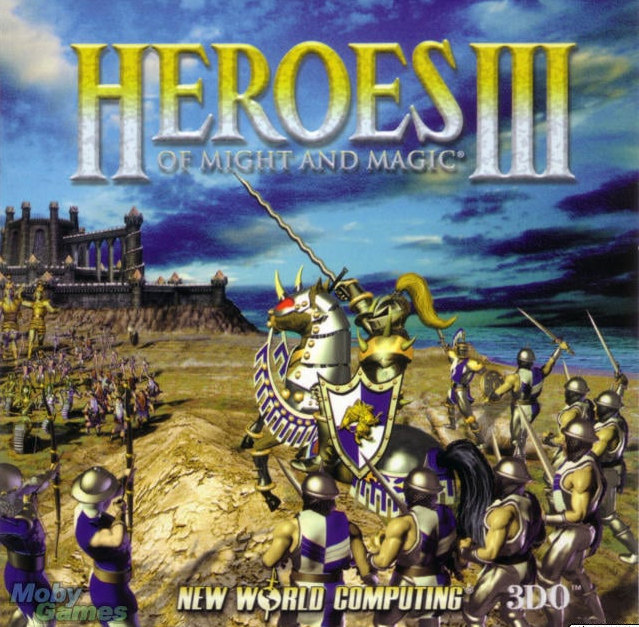

Seeing as how they have already made a great upgrade, my goal is to create a game with similar gameplay, but a much more chaotically fun combat system. One which will have thousands of unique units running around the screen hacking and chopping away with reckless abandon. This sounds like a job for Unity’s ECS system!
I started this project before ECS going through the Hex Map creation by Catlike Coding. Simply a great series of tutorials to get a programmer new to Unity to the next level.

Everything was great with this project until I learned about ECS. Then the dream of thousands of units began and I started my quest to reduce MonoBehaviours and implement ECS instead. Going through the many ECS tutorials out there, I revamped my hex map and got some serious speed improvements out of it.

Unfortunately, in my haste to implement ECS, I created a horrible web of references between objects and structures that made progress abysmally complicated and slow.



So my first order of business is to start with a clean object orientated framework that gracefully controls the lean powerful ECS code. As one might guess, it takes a lot of cleaning up to repair a patchwork program as moving any piece of code breaks all kind of references that were hard-coded in.
When I am done this, then I will hopefully come back with examples of clean, understandable, fast code that combines the gracefulness of OOP with the power of ECS. The end goal of having thousands of unique units doing there own thing.
Cheers,
Darryl
Hello and welcome to my blog documenting my learning and implementing Unity’s ECS style of programming. Like many others, I was very excited about this new-to-me paradigm of programming. Setting about on it with gusto, I read documentation and examples, went through tutorials and videos, all the while adding the pieces I learned into a new game project.
This endeavor got parked on the shelf for almost a year and upon coming back, I realized that my code was a mess of ideas implemented using poor shortcuts just to see the benefits of ECS running. The fact that Unity is rapidly evolving/changing also prompted me to redo my code starting with a much bigger frame of mind. Seeing as how ECS is still new to many, I thought others might benefit from my attempts to put it all together in a logical and effective way. Also, I needed to give my wife a reason why I bought a new computer when I wasn’t programming for the past several months!
This blog is going to be directed towards the user that has a good grasp of C#, proficient at using the Unity editor, and not looking for step-by-step, but rather good programming structures and useful tips to be more productive. So with that in mind, before we even think of coding those first lines, let us begin with my tricks for setting things up to make life easier.
My mom used to be a secretary back in the day when they were called secretaries and she always had notebooks with light green paper in them. When I asked why she liked green paper, she said that it is much easier on the eyes than white. This simple idea still works brilliantly today, just in the form of setting your background colours to something not so harsh on the eyes as white. Focusing for hours on the screen can take quite a toll on my eyes and this simple trick along with regularly looking away does wonders to prevent eye strain.
On the menu bar select Tools -> Options.
Then in the popup window select Environment -> Fonts and Colors
In Display items select Plain Text, then Item background – Custom
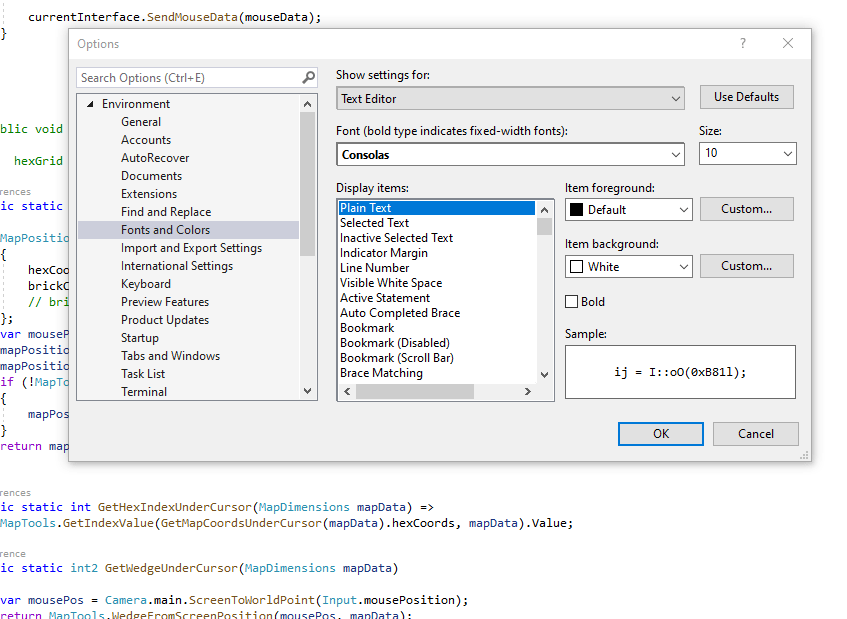
Use the wisdom of the secretaries of yore and choose a soft green. I chose R:224, G:234, B:219
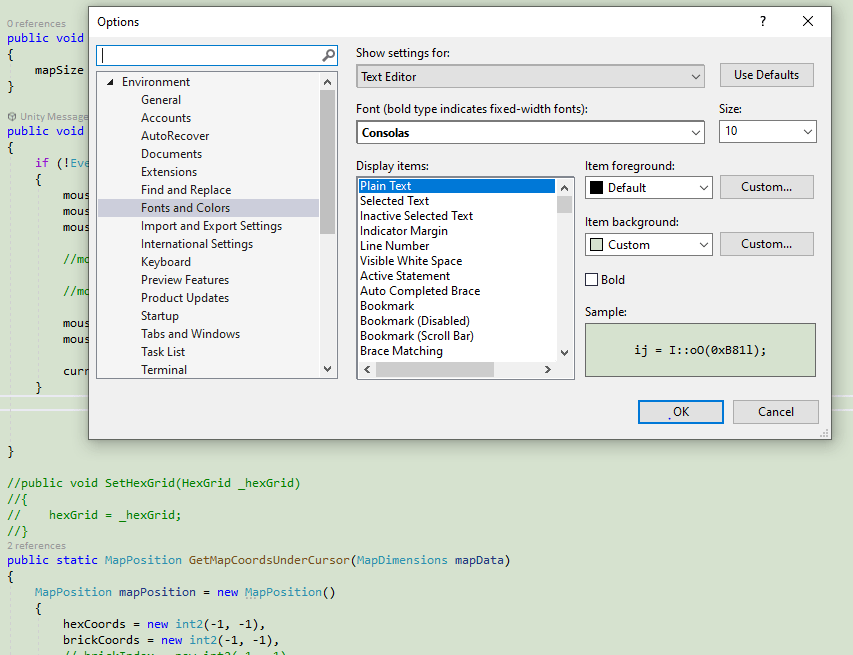
The Unity editor can also be modified to make life easier on your eyes
From the menu bar: Edit -> Preferences
In the popup: General -> Editor Theme -> Light
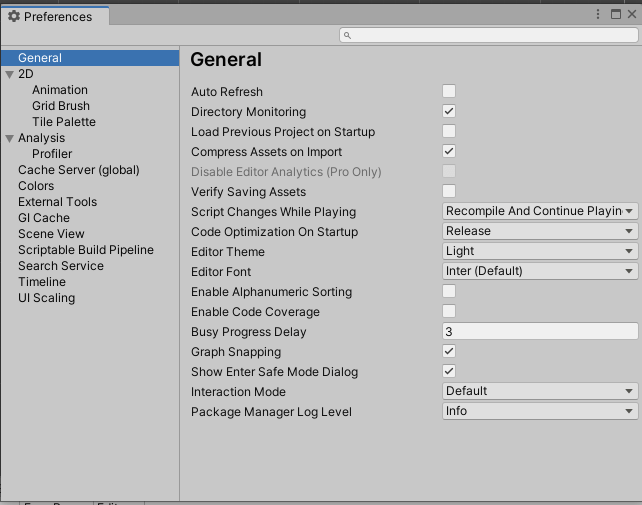
One can also change the colour to green like in Visual Studio. I am just happy with the Light theme for the moment.
The last and best piece of advice to save your eyes for the long hours of programming is to regularly look away. Now this sounds easy, but I a sure that I am not the only one that has spent hours staring at code, too focused to even blink, trying to debug an issue. My awesome solution is to play a turn-based computer game displayed on a big 60” screen on the other side of the room with my wife. Not only does it give my eyes a welcome change, it keeps the marriage working. If this doesn’t work for you, there are support groups for spouses abandoned by their programmer mates that will most likely not work as they will bond with other neglected spouses, start having an affair, and move out without you even noticing until three months later. Don’t be that guy!
So before you even start coding that first class, do yourself a favour and spend some time and preparation to make things easier on your eyes. I have too often in the past just let programming go for months simply because my eyes just couldn’t handle it. “Buy glasses with blue tint”, “Use eye drops”, none of this worked for me. As I said earlier, this blog is about getting more productive and making better code. Keeping your eyes and your marriage intact will be the best advice you will ever get regarding being a more productive coder.
Cheers for now,
Darryl
 Mighty Beaver Studios